webRPX
Browser-based control of your playlist from anywhere on the network.
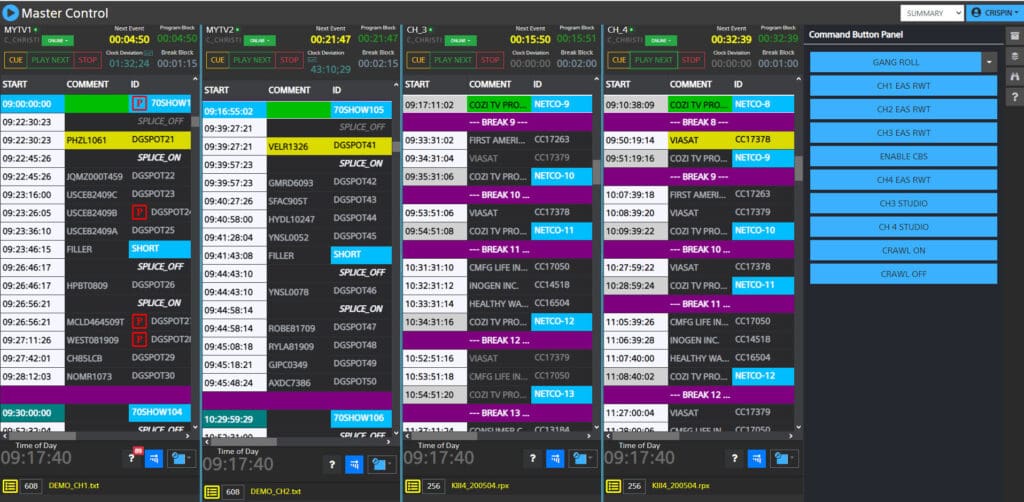
webRPX is a browser-based master-control and playlist software from Crispin, offering operators comprehensive, flexible control over broadcast playlists from anywhere on the network. Designed for a single channel to a complete enterprise environment, webRPX includes user controls, supporting both user management and customized views, empowering broadcast teams of all sizes.
Key Features

Multi-Channel Support
Customize views for single or multiple channels, optimizing oversight across your operations.

Intuitive User Interface
A user-centric design provides maximum information at a glance, streamlining playlist management and reducing operator error.

Playlist Editing
Operators can double-click any playlist event to open a properties window for on the fly updates (e.g., file name, source, duration).
Built-In Tools for Real-Time Editing and Control:
- Event Cabinet: Drag-and-drop functionality for inserting single events or event groups directly into the playlist.
- Command Buttons: Soft panel control for real-time actions like source changes, triggering graphics, or initiating breaking news.
- Media Browse: Search and drag content directly from your video server into the playlist.
- Find & Replace: Quickly find and update content across an entire playlist.
- Join-in-Progress (JIP): Easily execute JIP operations using multiple built-in approaches.
- Missing Media / Errors List: Centralized reporting of playlist content issues, eliminating the need to manually inspect each list.
- User Controls: CORE supports an unlimited number of users with different control rights, based on specific operator needs. Rights for access include master user, full access, specific channel access or view only.
Redundancy & Channel Sync
Playout Redundancy
A single playlist is used to control both the primary and backup playout ports. This eliminates the need to maintain separate playlists, reducing duplication of effort and potential for errors.
Bump Mode
In the event of a detected issue, the system can automatically switch (“bump”) from one side of the playout server to the other. Operators can view the playlist status and manually control which side of the server is active, providing operational flexibility and quick recovery.
Channel Sync
Dual playlists can be configured to manage both primary and backup systems or equipment. Changes made to one playlist are automatically reflected on the other, keeping them synchronized. This feature supports geographically separate systems, ensuring consistency and coordination across distributed playout infrastructures.
User Controls
Crispin’s flexible permission structure ensures secure and efficient system management across teams and locations.
- Scalable Access Management: CORE supports an unlimited number of users, each with customizable access rights tailored to their role or operational requirements.
- Granular Permissions: User access can be configured with various levels, including:
- Master User: Full system control and configuration access.
- Full Access: Operational control across all channels.
- Specific Channel Access: Rights limited to designated channels and/or sites.
- View Only: Read-only access for monitoring without control capabilities.